

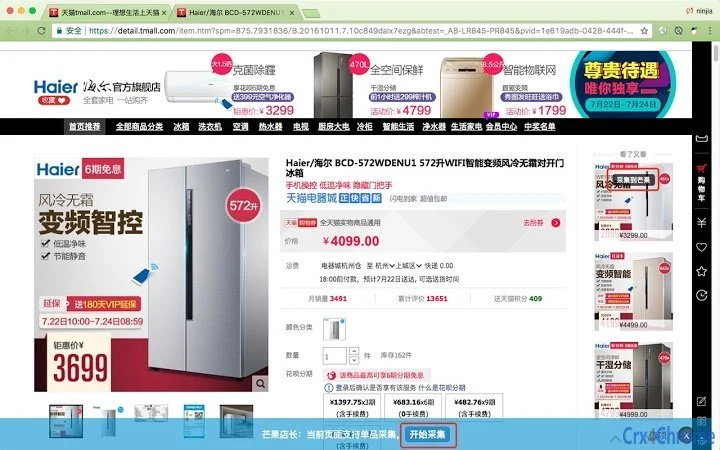
Description
Mango Manager Product Collector Tool
The Mango Manager product collection tool is designed for e-commerce professionals and online sellers seeking to streamline product research and multi-platform publishing. It enables users to collect product data from various online marketplaces, including Amazon, eBay, and AliExpress, with support for both individual product and category-level collection. The tool simplifies the process of gathering competitive pricing, product descriptions, images, and other key details, which can then be published across multiple stores on platforms such as Shopify and WooCommerce. This functionality supports businesses aiming to expand their product catalogs efficiently while maintaining consistency across channels.
Key Features & Capabilities
- Single Product Collection: Extract detailed product information from a single product page, including title, price, description, images, and specifications, enabling precise data gathering for competitive analysis or listing creation.
- Category-Level Scraping: Automate the collection of multiple products within a category, reducing manual effort when researching broad market segments or identifying trending items.
- Multi-Platform Publishing: Seamlessly transfer collected product data to various e-commerce platforms, supporting streamlined operations across multiple online stores.
- Structured Data Output: Deliver extracted information in a clean, organized format suitable for import into inventory management systems or listing tools.
- Web Automation Integration: Leverage built-in automation features to reduce repetitive tasks, improving workflow efficiency for frequent data collection needs.
These capabilities are particularly useful for dropshippers, marketplace sellers, and digital entrepreneurs who rely on accurate, timely product data to make informed business decisions. For example, a seller researching new product opportunities on AliExpress can collect a full category of items, analyze pricing trends, and publish selected products to their Shopify store without manual re-entry.
User Interface, Workflow & Performance
The user interface appears to be structured around a central dashboard that provides access to collection modes, data preview, and publishing options. Navigation is likely streamlined to support quick initiation of both single-item and batch collection tasks. The workflow emphasizes simplicity, allowing users to input a URL, select collection type, and initiate the process with minimal steps. Once data is collected, it can be reviewed in a preview window before export or direct publishing.
Performance details were not specified by the developer. However, based on typical behavior of similar desktop applications, the tool likely operates efficiently within standard system resources. The developer did not provide additional system requirements or information on CPU or RAM usage. Stability during prolonged use or large-scale data collection was not confirmed. General software behavior suggests reliable operation under normal conditions, though actual performance may vary depending on network speed and the complexity of target websites.
Compatibility & System Requirements
The software is compatible with both Windows and Mac operating systems, making it accessible to a broad range of users regardless of their preferred platform. It is available in version 1.0.0 with a file size of 45.2 MB, indicating a lightweight installation that should not place significant demands on storage space. The developer did not specify exact system requirements, including minimum CPU, RAM, or disk space needs. Compatibility information was partially provided, leaving some aspects of hardware and OS configuration unspecified.
Pros and Cons
Pros
- Supports both single product and category-level data collection
- Enables publishing to multiple e-commerce platforms
- Designed for e-commerce professionals and online sellers
- Lightweight installation at 45.2 MB
- Free to use with no licensing cost
Cons
- No detailed system requirements provided
- Performance and resource usage details were not disclosed
- Exact compatibility with all versions of Windows and Mac is unclear
- Limited information on update frequency or future development
- No official user support channels mentioned
FAQ Section
Is Mango Manager compatible with Windows and Mac?
Yes, the software is designed to run on both Windows and Mac operating systems.
Is the tool free to use?
Yes, the current version is available at no cost to users.
Can I collect product data from Amazon, eBay, and AliExpress?
Yes, the tool supports product data collection from major e-commerce platforms including Amazon, eBay, and AliExpress.
Does the tool require an internet connection?
Yes, an active internet connection is required to access product pages and perform data collection tasks.
Can I publish collected data directly to Shopify and WooCommerce?
Yes, the tool allows users to publish collected product information to multiple e-commerce platforms, including Shopify and WooCommerce.
Final Thoughts + CTA
The Mango Manager product collection tool offers a practical solution for e-commerce professionals who need to gather and manage product data across multiple platforms. With its dual capability for single-item and category-level scraping, combined with direct publishing support, it enhances efficiency in product research and listing creation. While detailed system requirements and performance metrics are not available, the lightweight footprint and cross-platform compatibility make it accessible to a wide audience. The free pricing model further increases its appeal for independent sellers and small business owners. For those focused on scaling their online stores through data-driven decisions, this tool provides a solid foundation for automation and growth.
Download Mango Manager now
Guides & Tutorials for 芒果店长 Extension for Chrome
How to install 芒果店长 Extension for Chrome
- Click the Preview / Download button above.
- Once redirected, accept the terms and click Install.
- Wait for the 芒果店长 Extension for Chrome download to finish on your device.
How to use 芒果店长 Extension for Chrome
This software is primarily used for its core features described above. Open the app after installation to explore its capabilities.
User Reviews for 芒果店长 Extension for Chrome 0
No reviews found





